Advanced settings of results tables
At the bottom of the results window for objects of the same type or the results of time serie window for a selected object, the button “Advanced Settings” allows to change the data format, in particular, one can choose to:
- Select the number of decimal places used for the display.
- Convert length in different units: m (metric system, ISU=International System of Units), feet (UK, USA).
- -* Convert discharges in different units: m3/s (ISU), Ml/day (Mega liters per day, Australia), cfs (cubic feet per second, USA).
Warning, these units are modified only in these hydraulic results (not in the edition of geometric or hydraulic data which remain in metric units, nor in the storage of the results in the xml project file or binary files if applicable). The longitudinal abscissas remain in meters (m). The results in m2 (areas, surfaces) and m3 (volumes) are kept in metric units (we can change it in a next version if you wish). On the tables there is no reference to the unit that has been changed, in the label at the top of the columns. On the other hand, on the graphs the units are correctly mentioned on the legend of the y-axis (m, feet or pieds, m3/s, Ml/day or cfs, etc.). You must therefore be very careful when using this option, which is stored in the Edisic settings (Edital.ini, in the exe subdirectory, with for example UnitLResults=2, UnitQResults=3), and is therefore retained between different uses of Edisic. A warning and confirmation request is made at the opening of a project to clarify this option. Exports of results by the regulation modules (e.g. PRINT module) or by SicExport remain in metric units.
In this window you can also choose not to display some columns and display additional data derived from existing data.
For sections, we will be able to calculate:
- Water depth and free-board;
- Discharge and hydraulic surface of the minor bed in the case of a minor-medium bed;
- The speed of wave (c) and V+c and V-c where V is the flow velocity (V=Q/S). To get these variables the calculation must have been done with calculation of wetted area (for c and V) and top width (for c);
- DTVPC: The time (in seconds) needed to get a Courant number of 1 (dt=dx/(V+c)). Please note that DX is calculated only based on the display sections; this should be done for the calculation sections. Therefore, all calculation sections should first be switched to display sections;
- The lateral discharge;
- The Manning of minor and medium beds.
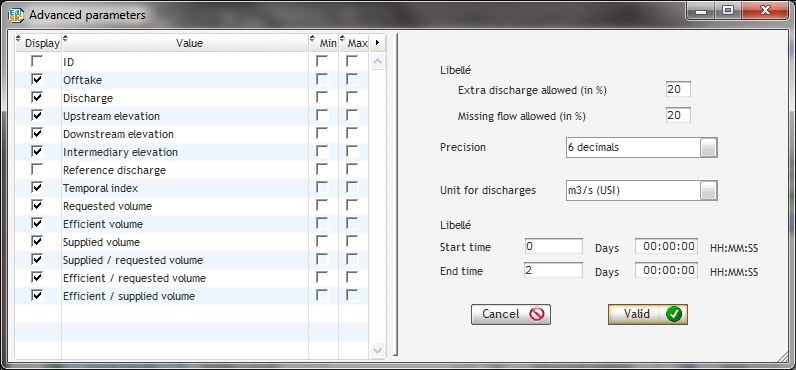
In the case of displaying the list of an object type on several time steps, it is possible to display the minimum and maximum for each variable over time and elapsed volume. For all the volumes calculated, the window offers to define the begin time and end time to be used for the calculation.
For the offtakes additional indicators are available:
- The volume requested calculated from the integration of reference discharge at offtakes;
- The effective volume (the lower and excess tolerance compared to the requested discharge can be parametrized in this same window);
- Different ratios: supplied / requested, efficient / requested, effective / supplied;
- The time index.
The method of calculating volumic indexes and the time index are described in the theoretical documentation.